Self-Ordering Kiosk Singapore: Prices, Hardware & Total Cost
Compare the cost of a working ordering journey, from the first tap to collection.
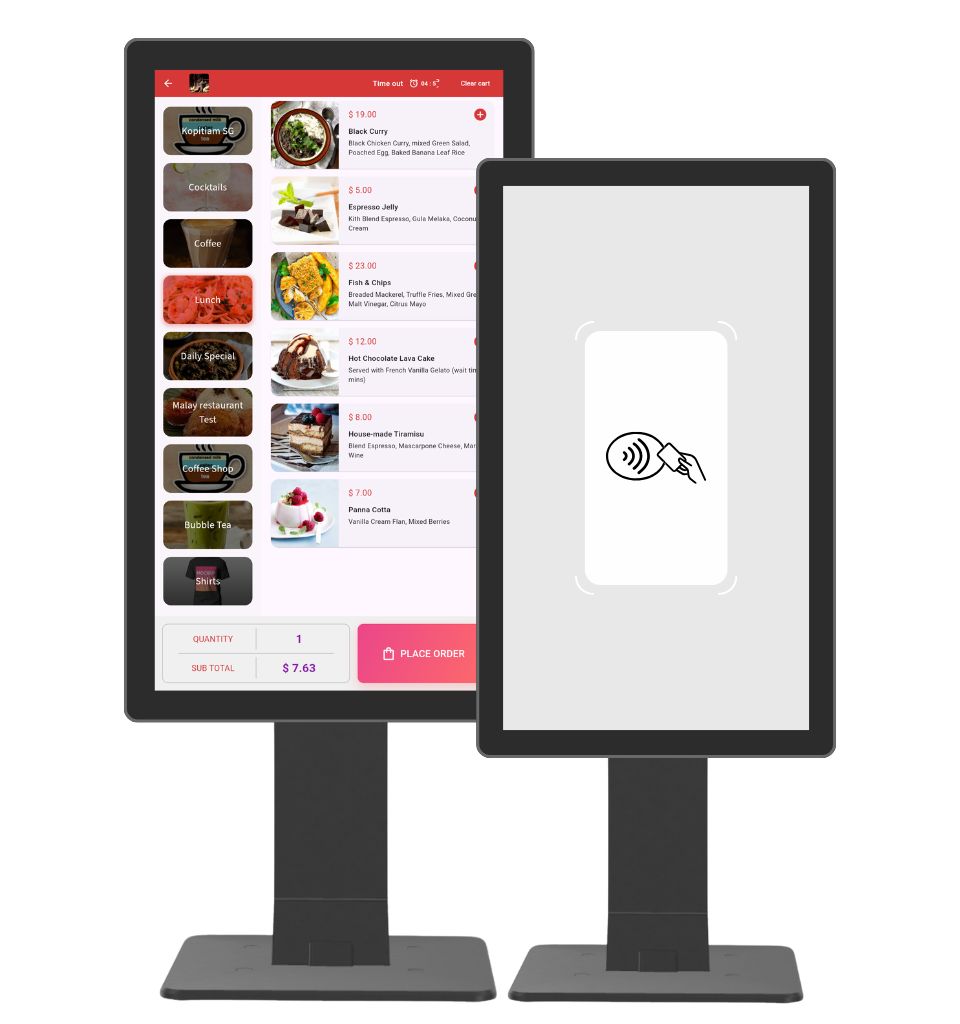
Authentic Rewardly product artwork. Device and payment compatibility depend on the quoted configuration; this is not a photograph of an installed outlet.
Budget for the whole outlet
A self-ordering kiosk price in Singapore can mean a screen, a software licence or a complete outlet bundle. Compare hardware, implementation, subscriptions, support and payment fees over the same period. The useful figure is the cost of taking a paid order through to collection, with a working fallback.
Start with one outlet, one customer-facing kiosk, one staffed POS, a kitchen printer or display, and a collection method. Add power, network access, a secure stand and staff training. This is a reference configuration, not a requirement to buy every device: a small counter might call order numbers instead of installing a pickup screen.
Observe a busy service before buying. If guests queue to order while the kitchen has spare capacity, self-service may help. If preparation is already the bottleneck, another ordering channel can simply move the queue. Measure order-entry time, abandoned queues and staff interventions during a pilot.
Published prices: read the scope first
Checked 5 October 2026. These examples illustrate different pricing models; they are not like-for-like quotations or a cheapest-provider ranking. Confirm GST, contract length and the complete equipment list in writing.
| Provider | Published reference | What to clarify |
|---|---|---|
| Dinlr | Kiosk S$89/month per device, billed annually. | POS, kitchen display and hardware are separately listed. Annual billing affects cash due upfront. |
| AtlasSource: atlas.kitchen/self-ordering-kiosk-singapore | Quick-service bundle: S$322/month plus S$5,190 one-time setup. | Includes kiosk, POS, Dispatch and listed hardware. KDS is not listed as included; confirm tax and payment charges. |
| QashierSource: qashier.com/sg/shop/kits/qashierkiosk/ | Headline S$7/day; configurator also shows S$1,498 upfront then S$5/day. | Resolve the purchase model. Prices exclude GST. A S$200 monthly outlet fee applies below the stated 50% QashierPay transaction-volume threshold. |
| Rewardly | Professional starts at S$99/month; an all-modules option is listed at S$199. | Confirm the final kiosk configuration and how the upgrade is charged. Hardware and payment rates need a separate quote. |
Rewardly lists full LoyaltyOS, in-person setup, dedicated technical support and Open API access with Professional. Including loyalty in the subscription can simplify the comparison against separately priced modules. It does not establish that every kiosk configuration costs S$99, or that equipment and payment processing are free.
For purchase, ask who owns the equipment and pays for replacement. For rental, record deposits, minimum duration, damage charges and return conditions. Reusing a tablet only saves an equipment purchase if its operating system, peripherals, payment setup and support status are approved for the chosen configuration.
Follow one order before signing
Select each stage to expose the equipment, software and fee questions. Use the same journey during every supplier demonstration, including a declined payment and a sold-out item.
Order: define the menu and devices
Hardware: supported touch screen, stand, power and network.
Licence: kiosk device count, menu modifiers and availability controls.
Ask: are menu setup, photographs and future edits included?
A successful payment is not the end of the test. Check that the correct kitchen station receives modifiers, that staff can find the order, and that cancellation produces the right refund and report. Ask who resolves incidents involving both the POS supplier and payment provider.
Your 12- and 36-month budget
Illustrative example, not a vendor quote: S$2,400 equipment, S$300 implementation, S$150 monthly software, S$30 monthly support and S$200 monthly processing produce S$7,260 over 12 months or S$16,380 over 36 months. The example excludes GST, financing, replacements and price changes. It assumes constant monthly charges.
Replace every assumption below with a written quotation. Enter payment processing separately, using your expected sales mix and processor rates. Include minimum fees and per-transaction charges in that estimate. For a rental proposal, put recurring hardware charges in the rental field instead of counting the same device twice.
The calculation measures cost, not profitability or ROI. A monthly equivalent also hides annual prepayment: obtain an invoice schedule before committing. Keep conditional grant reimbursement separate from the money you must fund. Our POS grant comparison explains why a subsidised headline is not a complete cash-flow budget.
The buying checklist in 35 seconds
0:00 The screen is only one part of the price.
0:07 Follow one order: kiosk, payment, kitchen, pickup.
0:14 Add hardware, software, setup, support and payment fees.
0:21 Compare the same setup over 12 and 36 months. Illustration: S$2,700 upfront plus S$380/month; S$7,260 and S$16,380 respectively, excluding GST.
0:28 Ask for a complete kiosk quote before you buy.
When a kiosk is the wrong first purchase
QR ordering can suit seated diners using their own phones, with less customer-facing equipment. Keep an assisted option for guests who cannot or prefer not to use a phone. A staffed counter may suit a short menu, low order volume or products needing advice. Test usability with actual customers, not just confident staff.
If the immediate problem is payment handling, assess the supported SoftPOS workflow before adding an entire kiosk. Compatibility and payment approval still matter. Neither self-service nor contactless payment guarantees fewer staff or higher sales.
Five questions for a complete quote
- Which devices, licences, kitchen connections and payment methods are included?
- What is payable at signing, activation, renewal and cancellation?
- What are the processing rates, minimum charges and payment-provider conditions?
- Who handles training, outages, repairs and replacement, and within what response window?
- Can we demonstrate refunds, unavailable items and a counter fallback before acceptance?
Quick buyer FAQs
Does a kiosk subscription include hardware?
Only when the quotation explicitly includes it. Identify each device, ownership or rental terms, warranty and replacement responsibility.
Do I still need a POS?
Usually you need a way for staff to manage sales, exceptions and reporting. Whether that requires a separate terminal or licence depends on the proposed system.
Can I use an existing payment terminal?
Do not assume integration. Ask the POS and payment providers to confirm the exact terminal, connection and refund workflow.
What should I send for a Rewardly quote?
Share outlet count, peak orders, menu complexity, kitchen stations, current devices and preferred payments. EISOL can scope the Rewardly F&B setup around that operating model.
Price your complete ordering journey
Bring your equipment list and busiest service scenario. We will help identify the components that need to be quoted.
Request a complete kiosk setup quote